From the emergency room to the ward.
DocPad's intended purpose covers outpatient care, inpatient stays and inpatient emergency medicine. Patient data is captured in structured form, wherever the patient happens to be.
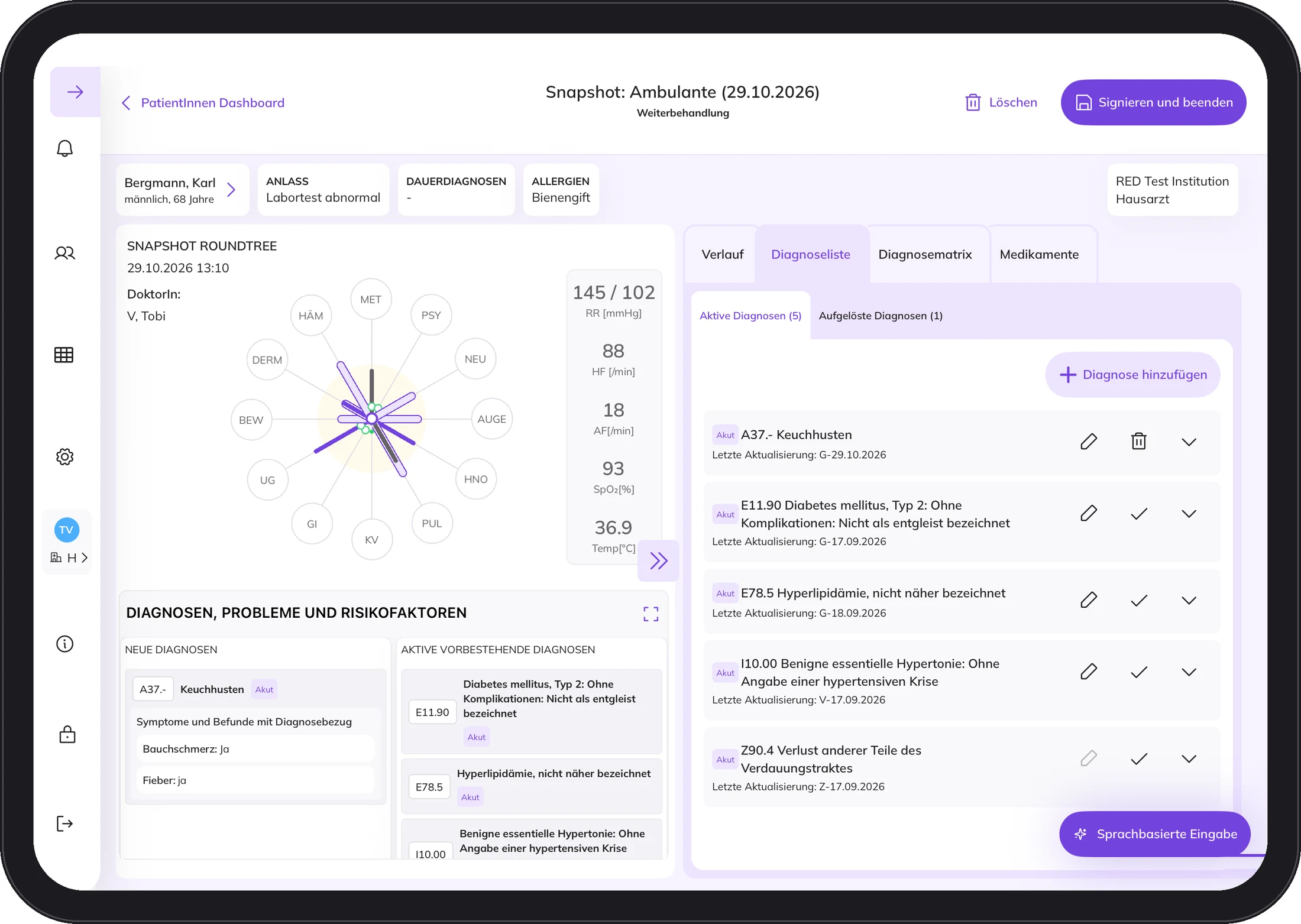
One picture of the patient. From admission onwards.
In the emergency department.
A Snapshot records vital signs, symptoms and findings in structured form, assigned to the twelve body systems. Anyone who takes over the patient sees what is happening now.
On the ward.
An episode can contain many Snapshots. Each one is a single observation, for example during the ward round. This makes the course of the stay visible.
Over time.
The timeline shows the captured history, separated into outpatient, emergency and inpatient.
When a junior doctor documents, the supervisor countersigns.
Your HIS stays as it is.
The same connector that links practice systems also addresses hospital information systems.
In a hospital, getting there usually takes longer because IT and data protection have their own review steps. We bring the documents needed for this and agree the start with your IT and your data protection team.
The data is stored encrypted in a German cloud at STACKIT. Each facility is separated from the others.
What it takes
Little technology. A good introduction.
Five things and you are ready to go. Tap a symbol.
1 / 5
An iPad Air.
11 inch, 5th generation, M2 or M3. DocPad is developed, tested and validated for these.
- One approved iPad per clinician
- No patient data is stored on the device
- No other apps besides DocPad
2 / 5
Stable, encrypted Wi-Fi.
In the treatment rooms, with internet access. DocPad does not run without internet, and we would rather say so up front.
- At least WPA2
- Never a public network
- A contingency plan and a spare device are part of it
3 / 5
Connected to your HIS.
The same connector that links practice systems also addresses hospital information systems. We coordinate the start with your IT and your data protection team.
- Master data comes from the HIS
- The final report goes back after you sign
- Your HIS stays as it is
4 / 5
Training for the whole team.
All users are trained before first use, so everyone knows how episodes and snapshots work.
- Your key user gets more in-depth training
- They can onboard new colleagues later
- Training videos on docpad.cloud
5 / 5
In German.
The DocPad interface is in German. Instructions for use and training videos are on docpad.cloud.
- Instructions for use for every version
- Printed copy on request within seven days
- User information with every new version
How a pilot works.
Seven steps from the first conversation to regular operation. You can see the first days on site in more detail below.
1. Initial conversation
- You tell us what you hope to get from DocPad.
- We clarify which hospital information system you work with.
- If we do not yet have an interface to your hospital information system, the start may be delayed. We will tell you right at the beginning.
2. Visit to your hospital
- We get to know each other in person.
- We accompany your team through a day on the ward.
- Together we decide which doctors and which areas DocPad starts with.
3. Pilot contract and preparation
- Pilot contract with a fixed start and end date, plus the data processing agreement.
- You name a person from your team as key user. They are your internal contact for DocPad.
- We coordinate the start with your IT and your data protection team.
4. Kick-off Day 1
- The DocPad team introduces itself.
- Time for questions and answers.
- Lunch together.
- DocPad live and setup of the iPads.
5. Training from day 2
- Up to two days, depending on the number of participants.
- Your Key User receives more in-depth training and can later train new colleagues themselves.
6. Accompanied start
- For up to three days after the kick-off, we work alongside you. How long depends on how confident your team feels.
- After that come fixed appointments: after about three days, after two weeks and after five weeks.
7. Regular operation
- Final review meeting.
- Fixed contacts for medicine, technology and organisation.
- Transition from the pilot to the regular contract.
The first days on site
Day 1 Kick-off
YouYour team takes part and asks questions.
UsIntroductions, DocPad live, setup of the iPads, lunch together.
Day 2 Training
YouYour team gets to know DocPad.
UsTraining for everyone, more in-depth for the Key User.
Day 3 Training or practice
YouFirst patients with DocPad.
UsSecond training day if needed. Otherwise at your side.
Day 4 Accompanied
YouWorking with DocPad.
UsAt your side for as long as your team wants.
We are with you for up to three days after the kick-off. You and your team decide how long.
What we are often asked.
Does this also work in a hospital with a HIS?
Yes, the same connector also addresses hospital information systems. In a hospital, getting there usually takes longer because IT and data protection have their own review steps. We bring the documents needed for this.
Who is DocPad for?
For doctors at all levels of care and for assisting professions. The intended purpose covers outpatient care, inpatient stays and inpatient emergency medicine, without restriction to one speciality.
What happens if the internet goes down?
DocPad does not run without internet, and we would rather say so beforehand than afterwards. So keep a spare iPad and a contingency plan ready.
Does DocPad make diagnoses?
No. DocPad does not automatically create diagnoses. It accompanies the diagnostic process. The diagnosis is and remains the doctor's decision.
A conversation for your hospital.
Write to us and tell us who you are and what interests you. We'll send you information and talk in person if it suits.